Antiferromagnetic chain with rotating-frame calculation#
Source: python (.py) | jupyter (.ipynb)
This tutorial mirrors MATLAB spinW Tutorial 2
In this tutorial we will then take three different approaches to calculating the magnon spectrum
Creating unit cell containing with two spins pointing in different directions.
Using a unit cell with a single spin, performing a calculation that explicitly creates two unit cells containing opposing spins.
Using the “rotating frame” optimisation, which implicitly defines two cells. This has advantages in terms of speed and clarity for systems where it can be applied.
As in the previous tutorial we start by importing pyspinw
from pyspinw import *
Two spins per unit cell#
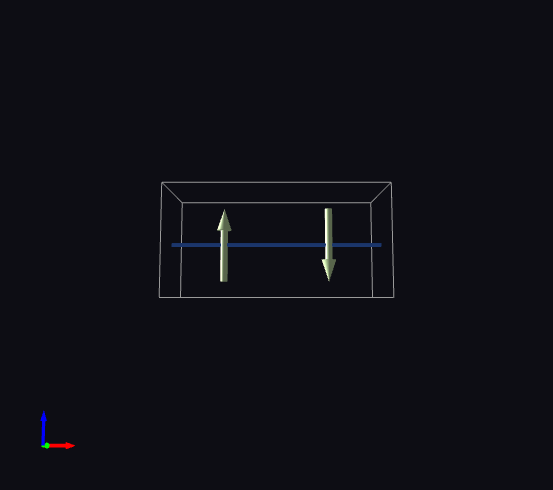
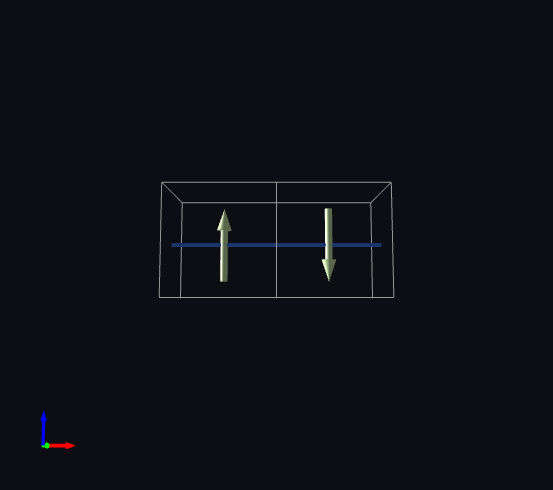
We create a magnetic structure with a 2x1x1 unit cell and two atoms - at 0.5 and 1.5 angstroms in \(x\), facing in different directions in \(z\).
two_site_unit_cell = UnitCell(2, 1, 1)
two_site_site_1 = Site(0.25, 0.5, 0.5, sz=1, name="a")
two_site_site_2 = Site(0.75, 0.5, 0.5, sz=-1, name="b")
two_site_structure = Structure([two_site_site_1, two_site_site_2], two_site_unit_cell)
Like in the previous example, there are different ways we can set up the exchanges, if we do it explicitly we have
two_site_exchanges = [
    HeisenbergExchange(two_site_site_1, two_site_site_2, j=1),
    HeisenbergExchange(two_site_site_2, two_site_site_1, cell_offset=(1,0,0), j=1)
]
Or using generate_exchanges, which should give the same result
two_site_exchanges = generate_exchanges([two_site_site_1, two_site_site_2],
                               unit_cell=two_site_unit_cell,
                               max_distance=1.1,
                               direction_filter=filter([1,0,0], symmetric=True))
If we check to see if it is the same we find that it is not identical to the hand-crafted version but it is equivalent, we have exchanges between a and b, one of which is offset by one cell in the \(x\) (lattice a) direction
for exchange in two_site_exchanges:
    print(exchange)
HeisenbergExchange('J1:a-b', a <-> b, offset=(-1, 0, 0), j=1)
HeisenbergExchange('J1:a-b', a <-> b, offset=(0, 0, 0), j=1)
Now we build a hamiltonian
two_site_hamiltonian = Hamiltonian(two_site_structure, two_site_exchanges)
View it
view(two_site_hamiltonian)
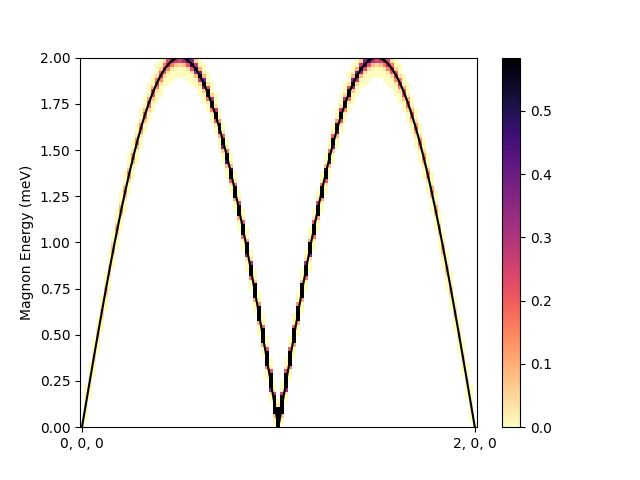
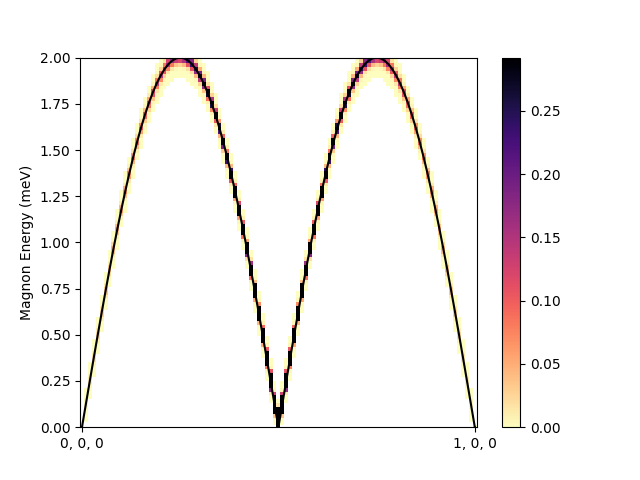
And plot the dispersion, here we specify the path in angstroms to make it comparable with different unit cells.
path = Path([(0, 0, 0), (1, 0, 0)], convert_to_lattice_units_with=two_site_unit_cell)
two_site_hamiltonian.spaghetti_plot(path)
One spin per unit cell (normal frame)#
We’ll now do calculations on the same system, but using a magnetic cell that is different from the unit cell.
We call magnetic cells supercells, and there are different options for this. First we’ll look at the case
which simply creates a 2x1x1 system explicitly during the calculation. There are a few options for this,
we will use a TransformationSupercell. This applies transformations to the original spin based on the relative
positions of the cells. We will tell it to use a rotation around the \(b\) axis (\(y\)), with a 2 cell
propagation vector in the \(a\) axis (\(x\)), i.e. (1/2,0,0).
unit_cell = UnitCell(1,1,1)
site = Site(0.5, 0.5, 0.5, sz=1)
supercell = rotation_supercell(directions=[(0.5, 0, 0)], axes=[(0, 1, 0)])
structure = Structure([site], unit_cell, supercell=supercell)
We only need to specify one exchange in this case, as it is implicit in the supercell description that exchanges are the same in each repetition. Again, \(j=1\) for an antiferromagnet.
one_site_exchange = HeisenbergExchange(site, site, cell_offset=(1,0,0), j=1)
hamiltonian = Hamiltonian(structure, [one_site_exchange])
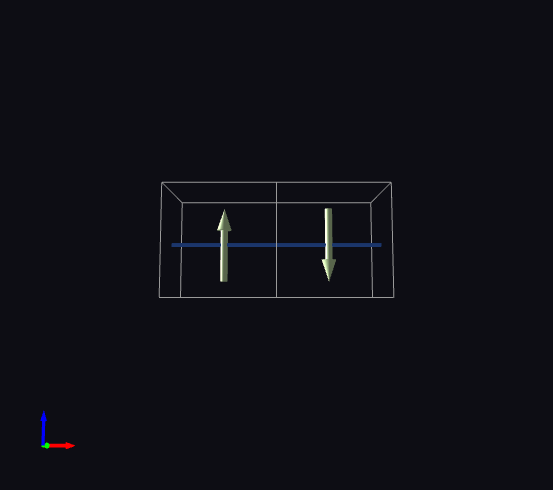
View it
view(hamiltonian)
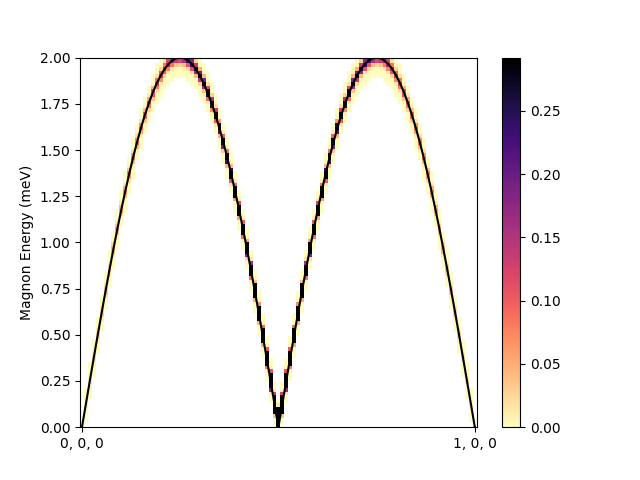
The dispersion looks the same, only we are going from zero to one reciprocal lattice units in this case, rather than zero to two, as we have two unit cells for the same physical system, rather than one.
path = Path([(0,0,0), (1,0,0)], convert_to_lattice_units_with=unit_cell)
hamiltonian.spaghetti_plot(path)
One spin per unit cell (rotating frame)#
The following generates a 2x1x1 supercell in which the spins alternate in y (period 2 rotation around z)
structure = generate_helical_structure(unit_cell, positions=[[1/2,1/2,1/2]], spins=[[0, 0, 1]],
                                   perpendicular=[1,0,0], propagation_vector=[0.5, 0, 0])
Generate Heisenberg exchanges based on distance (max_distance) and direction (direction_filter)
exchanges = generate_exchanges(sites=structure,
                               max_distance=1.1,
                               exchange_type=HeisenbergExchange,
                               j=1,
                               direction_filter=filter([1,0,0]))
Build the Hamiltonian
hamiltonian = Hamiltonian(structure, exchanges)
And create a spaghetti plot. We will be comparing structures with different unit cells, so,
path = Path([(0,0,0), (1,0,0)])
You can get a summary of the Hamiltonian using print_summary (also works on Structure)
hamiltonian.print_summary()
Unit Cell: (1, 1, 1), alpha=90, beta=90, gamma=90
Spacegroup: P 1
Supercell: Rotation
  size = (1, 1, 1)
  PropagationVector(0.5, 0, 0)
  Perpendicular=[1. 0. 0.]
Sites:
  Site(site00, 0.5, 0.5, 0.5, spin=[0. 0. 1.])
Exchanges:
  HeisenbergExchange('J1:site00-site00', site00 <-> site00, offset=(1, 0, 0), j=1)
View it using view
view(hamiltonian)
Now we can plot a spaghetti diagram, first we generate a path though the lattice from \(q=0\) to \(1\) reciprocal lattice unit in \(x\).
path = Path([[0,0,0], [1,0,0]])
Show a plot
hamiltonian.spaghetti_plot(path, scale='log')