
Tutorial 33#
Introduction to Plotting Chemistry#
We don’t care what is this model, we just test the plotting capabilities of SpinW.
Define the lattice#
symStr = '-z, y+3/4, x+3/4; z+3/4, -y, x+3/4; z+3/4, y+3/4, -x; y+3/4, x+3/4, -z; x+3/4, -z, y+3/4; -z, x+3/4, y+3/4';
model = spinw;
a = 10.0307;
model.genlattice('lat_const',[a a a],'angled',[90 90 90],'spgr',symStr,'label','F d -3 m Z')
model.addatom('label','Yb3+','r',[1/2 1/2 1/2],'S',1/2)
model.addatom('label','Ti4+','r',[0 0 0])
model.addatom('label','O2-','r',[0.3318 1/8 1/8])
model.addatom('label','O2-','r',[3/8 3/8 3/8])
model.gencoupling
model.addmatrix('label','J1','value',1)
model.addmatrix('label','g0','value',1);
model.addcoupling('mat','J1','bond',1)
model.addg('g0')
model.matrix.mat(:,:,2) =  -0.84*ones(3)+4.32*eye(3);
model.getmatrix('mat','J1');
J1 = -0.09; J2 = -0.22; J3 = -0.29; J4 = 0.01;
model.setmatrix('mat','J1','pref',[J1 J3 J2 -J4]);
Customizing the plot 1.#
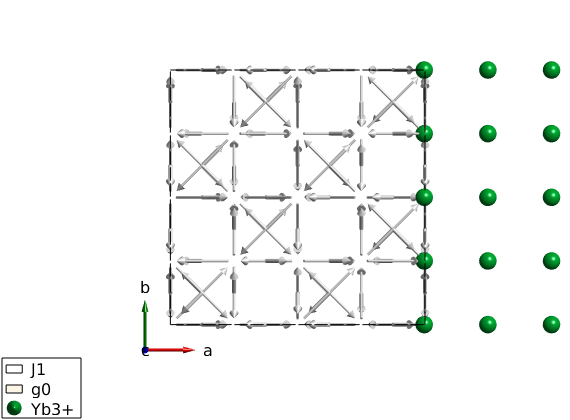
We setup the number of triangular faces to be produced by the plot command using swpref. Each atom is an icosahedron, where each face is subdivided into triangles nmesh-times (see swplot.icomesh function). Thus nmnesh=3 will make all sphere to have 1280 faces. npatch determines the number of subdivision of the circle that is used to generate cylinders an arrows (swplot.arrow and swplot.cylinder).
pref = swpref;
pref.set({'nmesh', 'npatch'}, {3, 50})

% The high level spinw.plot command calls lower level commands
% (swplot.plotatom, swplot.plotion, swplot.plotbond, etc). For details
% check the documentation of spinw.plot or any of the lower level
% functions. Any option of the lower level functions can be controlled by
% making new options as: lowlevelfunname + lowlevelfunoption, for example
% to set the color option of the swplot.plotatom function set 'atomColor'
% option in the spinw.plot method as in the example below. The low level
% functions can be also called separately.

plot(model,'tooltip',false,'atomMode','mag','atomColor','gold')

% Move the atoms by shifting positions by 10 Angstrom to the right.
swplot.plotatom('shift',[10 0 0]','mode','mag','replace',true)
Customizing the plot 2.#
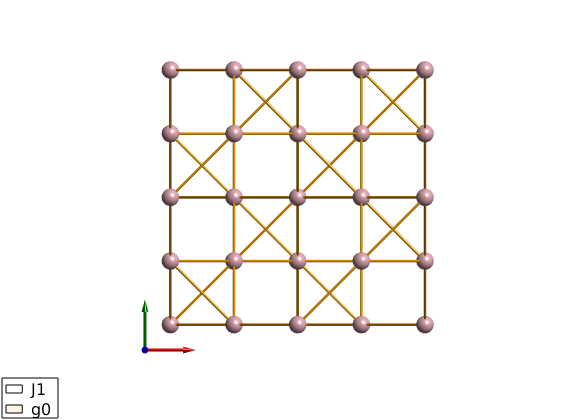
We show only the bonds and the atoms and changing colors.
model.plot('atomMode','mag','bondMode','cylinder',...
    'bondLinewidth0',3,'bondColor','orange','bondMode2','none',...
    'atomColor','pink','legend',false,'baseLabel',false,...
    'cellMode','none','tooltip',true)
Overplotting a polyhedron#
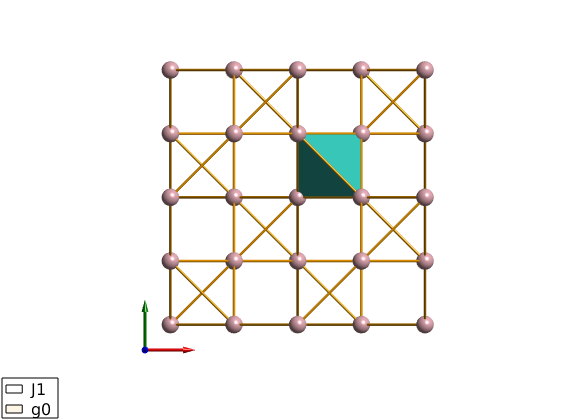
We overplot a tetrahedron between 4 magnetic atoms. The positions are in lattice units. Also Angstrom can be used by setting the ‘unit’ option of swplot.plot function to ‘xyz’.
R =[1/2 3/4 3/4;...
    1/2 1/2 1/2;...
    3/4 3/4 1/2;...
    3/4 1/2 3/4];

swplot.plot('type','polyhedron','position',permute(R,[2 3 1]))
Published with MATLAB® R2018b